Want Even More?

  • Sort coupons by expiration and categories!
  • Map or Call the nearest store or restaurant with a single tap!
  • Bookmark individual "Favorites" & never forget a deal!
  • Insert coupon reminders to your phone's calendar instantly!
  • Handy notepad organizer & MORE!
Signup or test drive the sample below!

See For Yourself!
The sample coupon below will demonstrate everything you will experience and enjoy as our latest VIP!

Tap the red square-shaped calendar icon to the right of this coupon:

Some great deal from your local McDonalds - coupon demonstration (08/01)

SAVE & ORGANIZE FAVORITES!

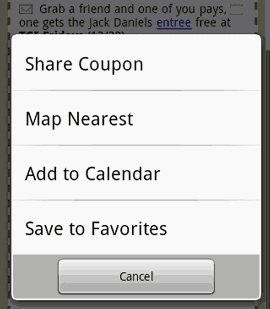
Save each coupon to your favorites for viewing anytime, anywhere. Remind yourself, plan shopping trips, or just organize for quick access and offline viewing:

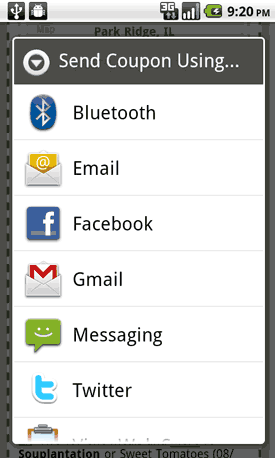
Choose how to share your coupons!

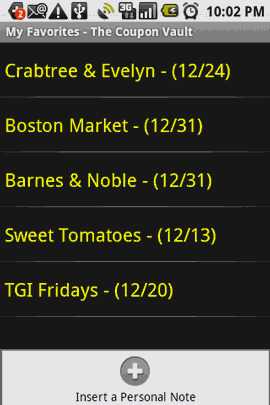
Then after saving, simply tap the favorites tab as shown here:

Any coupons you selected to save are now shown as a list with both detailed description, title and expiration (all automatically generated for you).

The most recently viewed coupon gets moved up to the top with each access. Signup

IT DOUBLES AS A HANDY NOTEPAD!

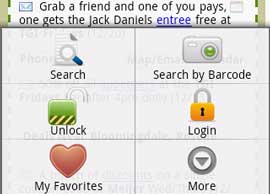
When viewing your favorites, simply tap your phone's "MENU" button and you may now insert a note. Use personal notes to remind you of items on your shopping list to use each coupon towards, or as a quick memo pad. They may be as long or brief as you like, because organization is the key to success!

Now Find What You Want Even Faster!

Sort coupons by expiration date and never miss a deal! Hungry? Simply tap the food button and you are shown only restaurants to quench those munchies quicker. Or get that shopping trip organized by displaying only retail stores!
Choose how to share your coupons!

More Ways to Share Your Coupons!

You've always been able to share via text messaging. Now share the deals you love with friends and family via email, Facebook, Twitter, chat programs and anything else installed on your phone!
Signup

Choose how to share your coupons!

Add to Your Calendar & Gmail Online!

Import individual coupons directly into your calendar, plus see them live from any computer when you signin to your Gmail account!

Sounds good, sure, but just how easy is this to do?

It's Easy as 1, 2, 3!

Keep things simple! Just tap the calendar icon that appears next to each coupon on the right hand side of your screen:

Step 1 - Tap the Calendar

You'll get a confirmation letting you know the calendar entry was successfully entered:

Step 2 - Tap OK to confirm!

That's it! Now if you view your phone's calendar (or login to your Gmail account on any computer) you will see each coupon calendar entry entered by date of expiration:

One-Tap Maps!

Find the nearest location to each coupon by simply tapping a button! You'll be able to get driving directions from your precise location to the nearest store/restaurant in just seconds!
Signup

Tap and Go!

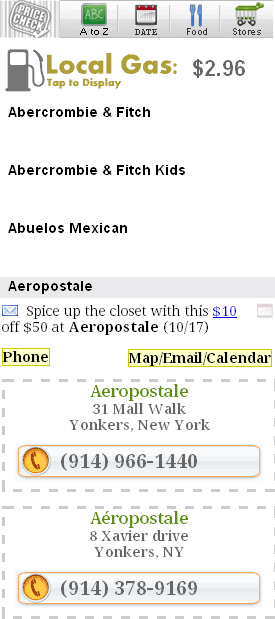
One-Touch Dialing!

Now phone the nearest location to each coupon with the touch of a button! Choose from several nearby locations, view street addresses & quickly connect to the merchant...instantly. Even tap the street address and we'll map it for you right then and there. Yes, it really is this easy!

One-touch Dialing!

Fast Search

Tapping the logo atop your screen is a quick new way for subscribers to access the search function.

Search Quicker

Leaner, Cleaner & Less Cluttered!

All the subscription reminders and example coupon demonstrations will instantly disappear and no longer be displayed after subscribing.

HURRY! ACT NOW!

Think of how much you've saved since installing The Coupons App. You are supporting the team arranging the thousands of new deals you see each month - bringing your local stores/restaurants on board is a costly, daily process. In fact, the updates today were made possible thanks to all the great supporters like yourself! BRAVO, you great supporter you!

Remember, as new features are added you'll have instant access to them... automatically!

Unlock Right Now - Instant Access!

   
Yearly Save over 15%
12 Months - Only $9.99 - Best!
   
Monthly  
Paypal - $0.99 Google - $0.99
   

Paypal Users: It has come to our attention the "Complete" button you tap to finalize payment is somewhat hidden. It is found at the very bottom of the payment page, and then you must scroll all the way to the right for it to come into view to be clicked/tapped. (or just hit the "enter" button on your keypad when done to submit without having to scroll)

Try now, cancel anytime! DON'T MISS OUT ON ANY LIMITED TIME SPECIAL PRICING!

Payment Page

It just keeps getting better! Give it a try, you deserve it! Cancel quickly & easily anytime, day or night! Your payment information is never revealed to us, it is securely handled through either payment processor and as such, cancellations are just as easy through the respective payment venue. You are in control at all times!

UNLOCKS & ENABLES FULL ACCESS INSTANTLY! NOTHING MORE TO DOWNLOAD OR INSTALL!

Your subscription is supporting the many daily updates and contributing to the exciting new features currently in development and coninuously pushed out for your satisfaction & convenience.

Note: Any questions or concerns please email the developer. Thank you!